How we've automated landing pages tasks with an OpenClaw Agent
Landing pages need constant updates — new copy, fresh sections, campaign tweaks. At Darwin, these small-to-medium changes used to queue up in engineering backlogs, competing with client work for developer attention. We asked ourselves: what if non-technical teammates could just ask for what they need and get it done immediately? That's exactly what we built with OpenClaw — and this very site you're reading was largely shaped by it.
The Agent in Action
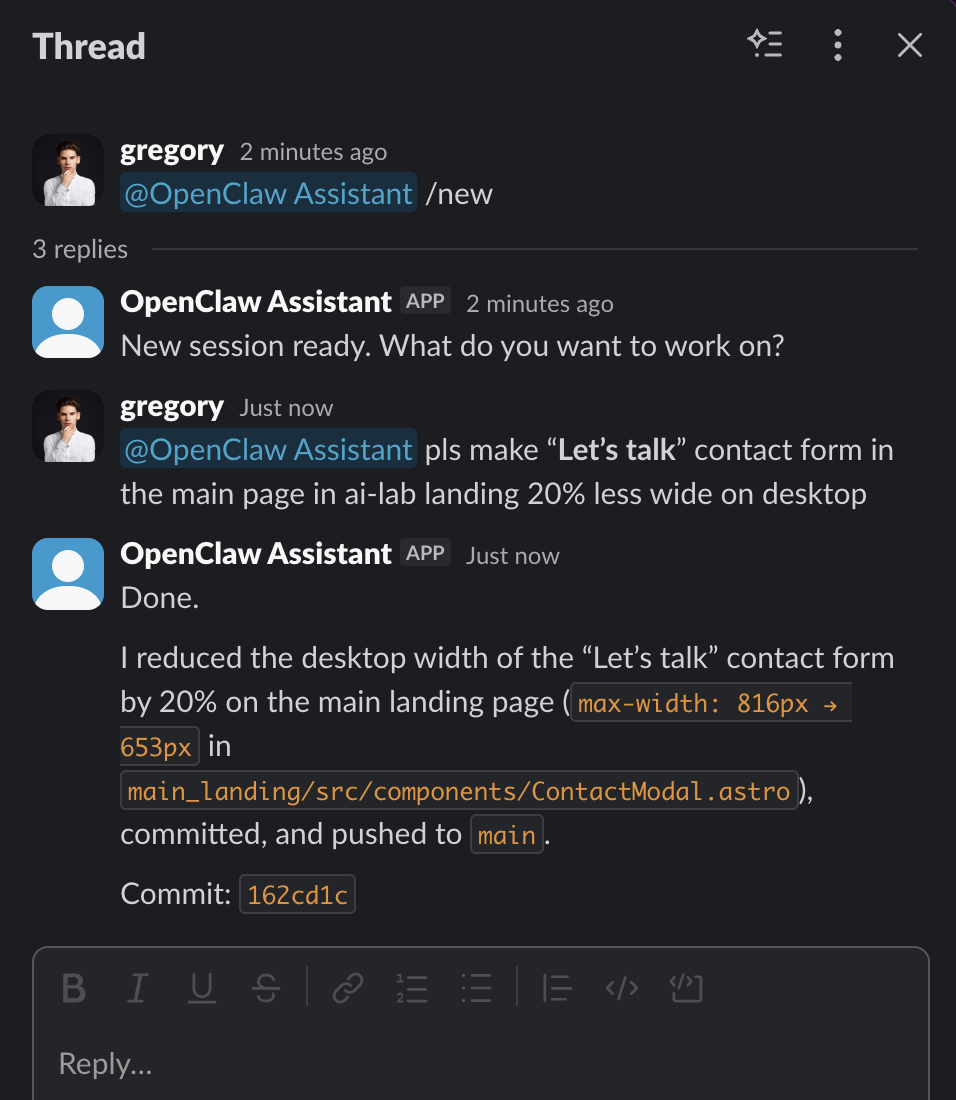
A real interaction from our Slack workspace. A team member asks the agent to resize the contact form — the change is implemented, committed, and pushed in under a minute.
Impact After 2 Weeks in Production
Engineers now focus on client projects and complex features instead of routine content updates
Marketing, sales, and operations teams can request changes anytime — no waiting for sprint planning
From a Slack message to a live preview on the staging environment
The Problem: Small Tasks, Big Bottleneck
At Darwin Apps, we maintain multiple landing pages for different products and initiatives. These pages require frequent updates — a headline change here, a new testimonial section there, a fresh campaign page for an upcoming launch. Each of these is a small task on its own, but collectively they consumed a significant portion of our engineering capacity. Non-technical colleagues had to file requests, wait for prioritization, and then wait again for a developer to pick up the work. Meanwhile, time-sensitive marketing opportunities would slip by. We needed a way to let the people closest to the content make changes themselves, without compromising code quality or deployment safety. OpenClaw — the open-source autonomous AI agent with over 68,000 GitHub stars — turned out to be the ideal foundation for this solution.
Key Features
Slack-Native Interface
The agent lives in a dedicated internal Slack channel. Colleagues simply describe what they need in plain language — 'Add a client testimonial to the homepage' or 'Update the pricing section on the AI Lab landing page' — and the agent gets to work. No tickets, no context-switching, no learning new tools.
GPT-5.3 Codex Under the Hood
The agent uses OpenAI's GPT-5.3 Codex as its coding LLM, which handles everything from understanding the request and locating the right files in our repositories to writing clean, production-ready code that follows our existing patterns and conventions.
Zero Direct Infrastructure Access
This is a key security decision. The agent can read and write code in our GitHub repositories, but it has no access to servers, databases, or deployment infrastructure. Instead, it triggers deployments through GitHub Actions CI/CD pipelines — a deliberate air gap that limits blast radius.
Staged Deployment Workflow
Every change goes through a two-step process: deploy to staging first, let the requester verify, then deploy to production. The agent manages this entire flow through Slack — colleagues simply say 'looks good, deploy to prod' when they're satisfied with the staging preview.
Deployed via openclaw-setup.me
We built and used openclaw-setup.me — our own platform for deploying secure OpenClaw agents. It provides isolated runtime environments, separated API keys (so the agent never sees LLM credentials directly), access control to ensure only approved team members can interact with the bot, and full cost transparency for every token used.
Repository-Aware Context
The agent has access to the relevant GitHub repositories containing our landing page source code. It understands the project structure, existing components, styling conventions, and data formats — so the code it produces is consistent with what a human developer would write.
How the System Works
Slack Channel (Non-Dev Team)
       |
       v
OpenClaw Agent (openclaw-setup.me)
       |
       v
GPT-5.3 Codex (Code Generation)
       |
       v
GitHub Repository (Code Changes)
       |
       v
GitHub Actions CI/CD
    /        \
   v          v
Staging    Production
(verify) (after approval) Request via Slack
A team member sends a message in the dedicated Slack channel describing what they need changed or created on a landing page
Context Gathering
The OpenClaw agent reads the relevant repository, identifies the right files, and understands the existing code structure and conventions
Code Implementation
Using GPT-5.3 Codex, the agent writes the necessary code changes — modifying existing files or creating new ones as needed
Commit and Push
Changes are committed to a branch in the GitHub repository with a clear, descriptive commit message
Deploy to Staging
The agent triggers a GitHub Actions workflow that deploys the changes to the staging environment — no direct server access required
Review and Go Live
The requester reviews the staging preview. If approved, they ask the agent to trigger the production deployment pipeline
Security by Design: Addressing OpenClaw's Known Risks
Let's be upfront: OpenClaw's explosive growth has brought legitimate security concerns. Security researchers have identified over 135,000 internet-exposed OpenClaw instances, with critical vulnerabilities like CVE-2026-25253 (a one-click RCE flaw). These are real risks — and exactly why we built openclaw-setup.me with security as the primary design constraint. Here's how our setup mitigates these concerns. First, isolated runtime: each agent runs in its own sandboxed environment, not on a developer's laptop or a shared server. Second, key separation: LLM API keys are managed at the platform level and never exposed to the agent itself, eliminating the most common credential leak vector. Third, access control: only pre-approved Slack users can interact with the agent — no anonymous or unauthenticated access. Fourth, no infrastructure access: the agent can only interact with code repositories and CI/CD pipelines, never with production servers, databases, or cloud consoles directly. Fifth, audit trail: every action the agent takes is logged and visible, from the initial Slack request to the final deployment trigger. The majority of OpenClaw security incidents stem from misconfigured self-hosted instances with default settings exposed to the internet. By using a managed, hardened deployment platform with defense-in-depth principles, we avoid the entire class of vulnerabilities that has security teams concerned.
Ready to try it?
Get in touch with our team to learn more.